
Grand Seiko Boutique Online offers a membership service for your convenience.
By registering, you will receive the latest information on new models and events as soon as it's available, as well as access to special offers exclusively for members.
Additionally, you can enjoy convenient features such as adding items to your favorites and receiving restock notifications, making your shopping experience more enjoyable.
To register as a new member, please follow the steps below.
(Registration for a Grand Seiko ID* is required to become a Grand Seiko Boutique Online Member.)
*Grand Seiko ID is a common ID for customers that allows you to use eligible services provided by Grand Seiko safely and comfortably. By registering, you can log in to the following eligible services as well as the Grand Seiko Boutique Online using the same email address, eliminating the need to manage separate IDs and passwords for each service.
For details about Grand Seiko ID, please click here .
Grand Seiko Boutique Online
Grand Seiko Electronic Warranty Service
GS9 Club
Please note that even members who registered with the Grand Seiko Boutique Online before March 4, 2025 (Tuesday) will need to register for a new Grand Seiko ID upon their first login. Members registered before March 4, 2025 (Tuesday) can find more information here .
New members can register using either their email address or LINE account. Please proceed with your preferred registration method below.
[How to register using your email address]
[How to register as a new member via LINE]
[How To Register Using Your Email Address]
① Access the new member registration page.

Access the Grand Seiko Boutique Online. On your smartphone, tap the two lines in the upper left corner, then tap the "New Member Registration" button located in the upper right corner of the menu that opens. On your computer, click the "New Member Registration" button from the My Account button (human-shaped button) located in the upper right corner of the page.
② New member registration for Grand Seiko ID
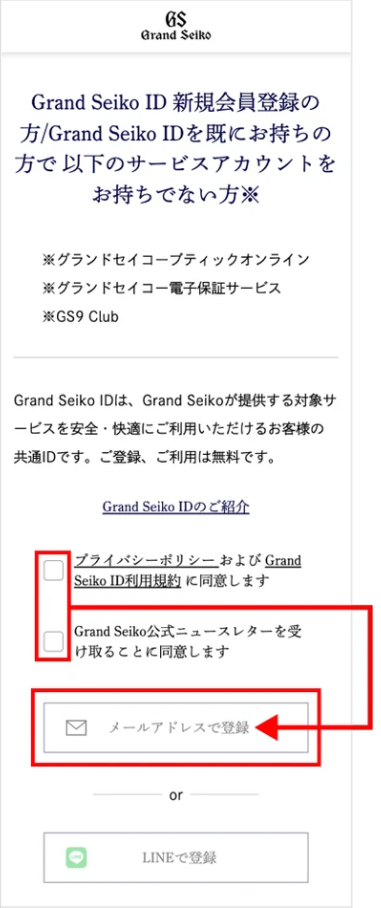
Please read the Grand Seiko ID "Privacy Policy" and "Terms of Use" before checking "I agree to the Privacy Policy and Grand Seiko ID Terms of Use" and "I agree to receive the official Grand Seiko newsletter," and then click the "Register with email address" button.
③ Enter your email address

Please enter the email address you wish to register as your Grand Seiko ID and click the "Send Verification Code" button.
- If you have domain restrictions set in your email settings, please remove them to allow emails from "@grand-seiko.com".
④ Enter the authentication code
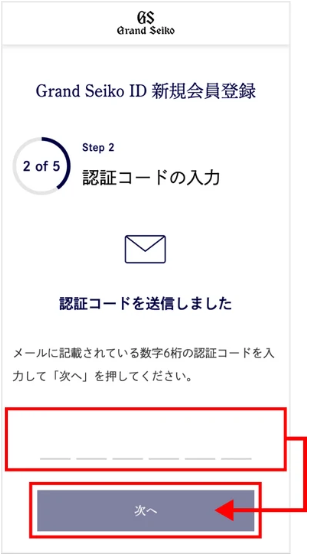
Please enter the 6-digit verification code provided in the email and click the "Next" button.
⑤ Enter and confirm member information

Please enter your membership information according to the fields and click the "Next" button.
Please check that the information you entered is correct on the input confirmation page, and then click the "Register" button.
⑥ Grand Seiko ID membership registration complete
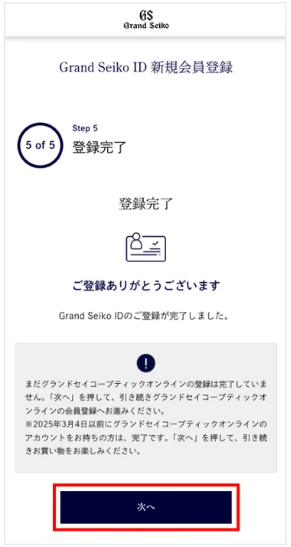
Your Grand Seiko ID registration is complete. Click the "Next" button to proceed with your Grand Seiko Boutique Online membership registration.
⑦ New member registration for Grand Seiko Boutique Online
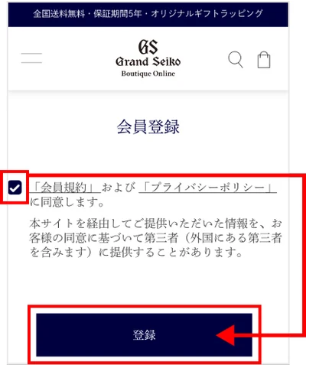
Please read the "Membership Terms" and "Privacy Policy" of the Grand Seiko Boutique Online, then check the box that says "I agree to the 'Membership Terms' and 'Privacy Policy'," and click the registration button.
⑧ Grand Seiko Boutique Online membership registration complete
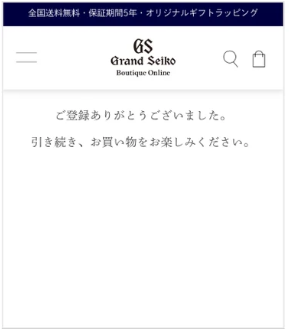
Your registration for the Grand Seiko Boutique Online has been completed. You will be automatically redirected to the Grand Seiko Boutique Online homepage.
Please continue to enjoy your shopping.
[How To Log In Using Your Email Address After Registering For A Grand Seiko ID]
① Access the login page

Access the Grand Seiko Boutique Online. On your smartphone, tap the two lines in the upper left corner, then tap the "Login" button located in the upper left of the menu that opens. On your computer, click the "Login" button from the "My Account" button (a person-shaped button) located in the upper right corner of the page.
② Grand Seiko ID login

Please click the "Login by email" button on the Grand Seiko ID login page.
③ Enter your email address

Please enter your registered email address and click the "Send Verification Code" button.
④ Enter the authentication code
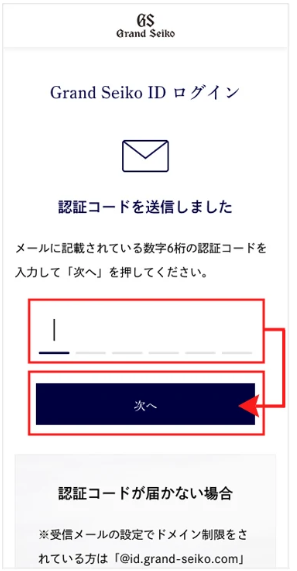
Please enter the 6-digit verification code provided in the email and click the "Next" button.
⑤ Login complete
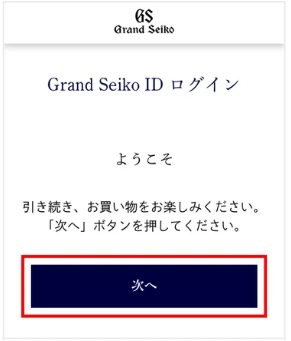
Clicking the "Next" button will complete the login process and redirect you to the Grand Seiko Boutique Online homepage where you are logged in.
Please continue to enjoy your shopping.
[How To Register As A New Member Via LINE]
① Access the new member registration page.

Access the Grand Seiko Boutique Online. On your smartphone, tap the two lines in the upper left corner, then tap the "New Member Registration" button located in the upper right corner of the menu that opens. On your computer, click the "New Member Registration" button from the My Account button (human-shaped button) located in the upper right corner of the page.
② New member registration for Grand Seiko ID
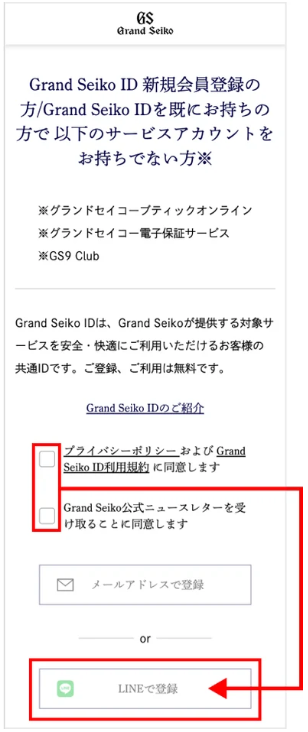
Please read the Grand Seiko ID "Privacy Policy" and "Terms of Use" before checking "I agree to the Privacy Policy and Grand Seiko ID Terms of Use" and "I agree to receive the Grand Seiko official newsletter," and then click the "Register with LINE" button.
③ LINE authentication
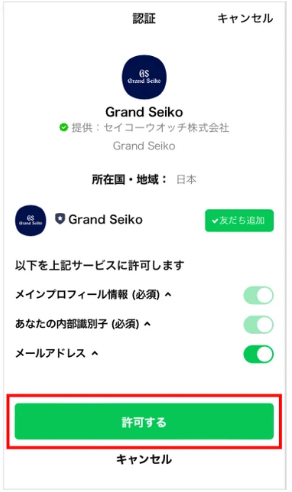
Please click the "Allow" button after allowing the "Email Address" in the "Allow the above service to access the following" section.
④ Enter your email address
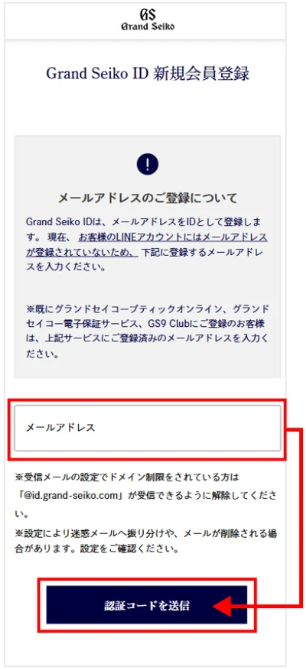
If your LINE account does not have an email address registered in step ③, please enter the email address you wish to register as your Grand Seiko ID and click the "Send Verification Code" button.
- If you have domain restrictions set in your email settings, please remove them to allow emails from "@grand-seiko.com".
If your email address is already registered with your LINE account, please proceed to step ⑥.
⑤ Enter the authentication code
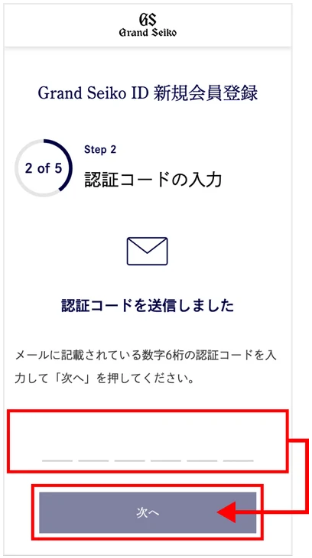
Please enter the 6-digit verification code provided in the email and click the "Next" button.
⑥ Enter and confirm member information
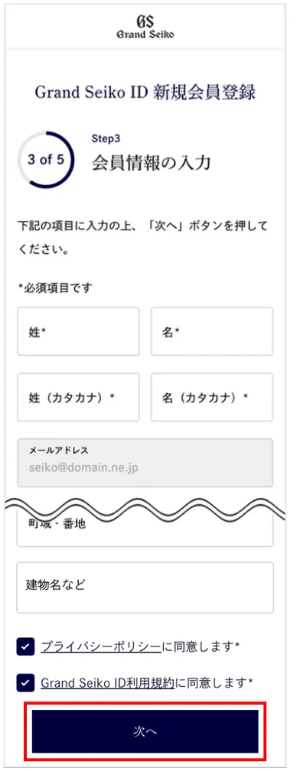
Please enter your membership information according to the fields and click the "Next" button.
Please check that the information you entered is correct on the input confirmation page, and then click the "Register" button.
⑦ Grand Seiko ID membership registration complete
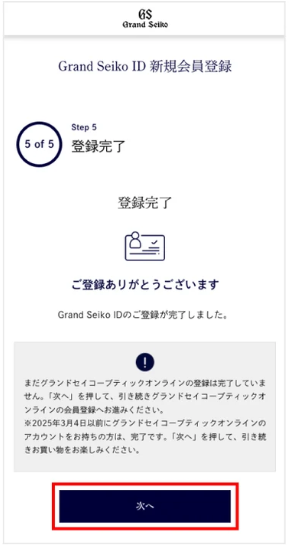
Your Grand Seiko ID registration is complete. Click the "Next" button to proceed with your Grand Seiko Boutique Online membership registration.
⑧ New member registration for Grand Seiko Boutique Online

Please read the "Membership Terms" and "Privacy Policy" of the Grand Seiko Boutique Online, then check the box that says "I agree to the 'Membership Terms' and 'Privacy Policy'," and click the registration button.
⑨ Completed registration for Grand Seiko Boutique Online.

Your registration for the Grand Seiko Boutique Online has been completed. You will be automatically redirected to the Grand Seiko Boutique Online homepage.
Please continue to enjoy your shopping.
[How To Log In Via LINE After Registering For A Grand Seiko ID]
① Access the login page
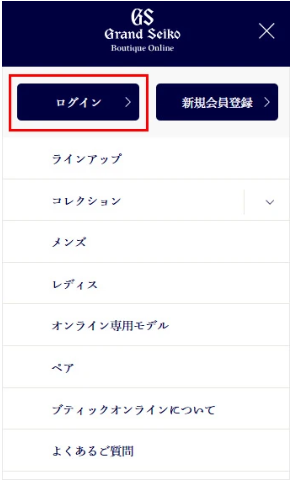
Access the Grand Seiko Boutique Online. On your smartphone, tap the two lines in the upper left corner, then tap the "Login" button located in the upper left of the menu that opens. On your computer, click the "Login" button from the "My Account" button (a person-shaped button) located in the upper right corner of the page.
② Grand Seiko ID login

Please click the "Login with LINE" button on the Grand Seiko ID login page.
If you are using a smartphone, the LINE app will launch and login authentication will be performed, so please wait. If you are using a computer, the LINE screen will be displayed, so please log in with your LINE account.
③ Login complete

Clicking the "Next" button will complete the login process and redirect you to the Grand Seiko Boutique Online homepage where you are logged in.
Please continue to enjoy your shopping.